Ammo HUD
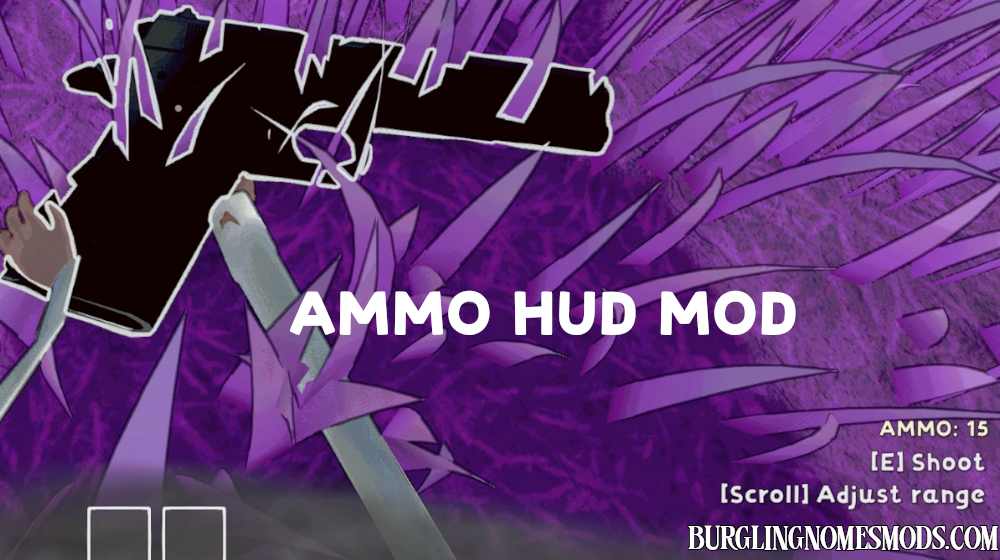
Ammo HUD gives you a simple on-screen ammo counter for the gun you’re currently focusing on.
So now you can check ammo at a glance without guessing what’s left in the mag.
The counter fades in when a gun is in focus, fades out smoothly when you look away, and briefly keeps showing the last visible weapon’s ammo instead of popping off instantly.
Short presentation:

The mod is fully configurable, change the values in BurglinGnomesMods.com.AmmoHUD.cfg or use Mod Config Manager.
Configurable Settings:
- AnchorPreset = BottomRight; BottomRight or AboveItemUI.
- OffsetX = -48; Horizontal offset from the selected anchor preset.
- OffsetY = 200; ## Vertical offset from the selected anchor preset.
- FontSize = 34; Ammo HUD font size.
- LabelFormat = AMMO: {0}; Displayed ammo text.
- ShowWhenEmpty = true; Show the HUD when the focused gun has 0 bullets.
- ScanInterval = 0.05; How often the mod scans for a focused gun.
- FadeOutDuration = 0.18; Fade-out duration after the gun leaves focus.
- FadeInDuration = 0.08; Fade-in duration when a gun enters focus.
- MaxFocusDistance = 8; Maximum distance from camera for a gun to count as focused.
- FocusViewportRadius = 0.14; How close to screen center the gun must be to count as focused.
Requirements: BepInEx 5
The mod was created by burglingnomesmods.com.
How to Install
- Make sure you have BepInEx 5 installed.
- Download Ammo HUD mod and unzip the archive to Burglin’ Gnomes\BepInEx\plugins.
Detailed guide: How to install mods for Burglin’ Gnomes.